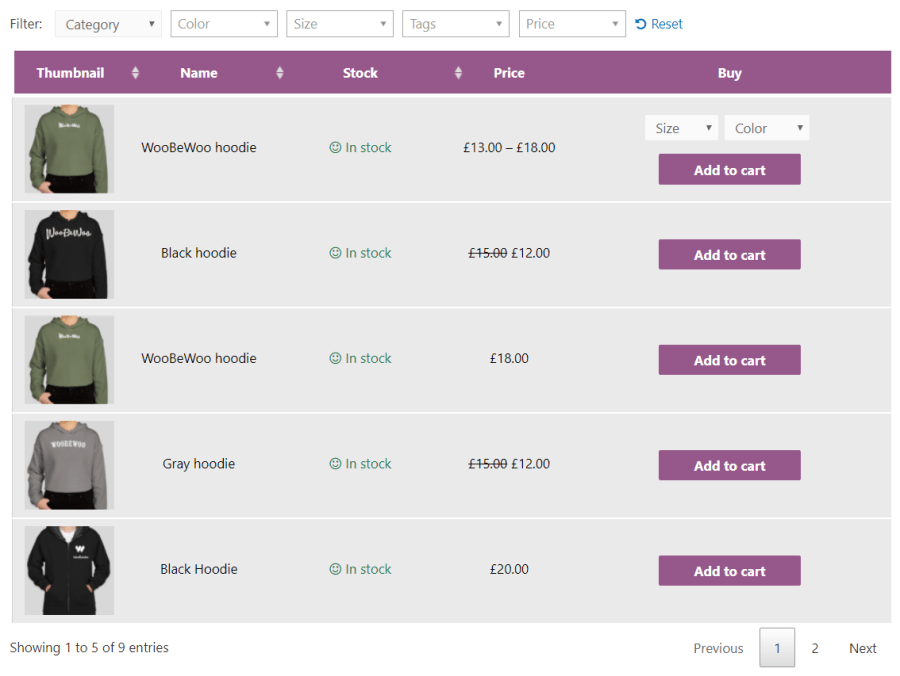
List products with searchable, filterable, responsive Product Table. Perfect for product list views, order forms, wholesale, product catalogues & more.
Product Table plugin allows listing your WooCommerce products in a searchable table layout with filters. It’s hugely popular for quick order forms, large product catalogs, restaurant order systems, wholesale layouts, price list and more.
Display items in a responsive table, generated automatically, with full control over the what’s displayed – with no coding required.
The WooCommerce product table lets you add product tables anywhere on your site. To list products in a table, simply add them to the table with the help of sortable and searchable form, select the product properties you would like to display as columns and add a table on any page via a shortcode.
The WooCommerce Product Table plugin includes over 50 features, and we’re constantly adding new ones in response to our customers’ feedback. Combine them in different ways to create unique tables listing your store’s products.
The plugin fully supports variable products, allowing you to manage and display product options with ease. You can control how variations appear in your product table to make shopping simple and intuitive:
Include variation dropdowns directly in the Add to Cart column
List each variation in its own row
Link to the single product page for detailed selection
2. Navigation and Performance
Improve user experience with fast filtering, searching & sorting options. The plugin ensures your customers can find what they need quickly, even with large product catalogs:
Search, sort, and filter products instantly
Pagination & server-side processing for large tables with hundreds or thousands of products
Lazy load for faster table performance
3. Multi-select add to cart
Increase sales by allowing shoppers to add multiple products and variations to their cart directly from the product table. Customers can select products easily using:
Checkboxes for multi-select
Add All to Cart button
Standard Add to Cart button
This feature lets shoppers conveniently add several items at once, improving the shopping experience and boosting conversions.